Elsewhere
Release TIL Research Tool Museum Sighting
Filters: Sorted by date

An embarrassingly tiny release. The pyproject.toml had pinned to datasette==1.0a27, inadvertently making this plugin incompatible with all other Datasette versions. It's now datasette>=1.0a27 instead.



I'll write more about this one soon, but it's a big release. Three highlights from the release notes:
- New "Create table" interface in the database actions menu, backed by the
/<database>/-/createJSON API. It can define columns, primary keys, custom column types,NOT NULLconstraints, literal defaults, expression defaults and single-column foreign keys. (#2787)- New "Alter table" table action and
/<database>/<table>/-/alterJSON API for changing existing tables: add, rename, reorder and drop columns; change column types, defaults,NOT NULLconstraints, primary keys and foreign keys; and rename the table. The alter table dialog also includes a "Drop table" button. (#2788)- New Template context documentation listing the variables available to custom templates for Datasette's core pages. Variables documented there are treated as a stable API for custom templates until Datasette 2.0. The documentation is generated from dataclass definitions next to the view code, with tests that compare the documented fields against the actual contexts rendered by the database, table, query and row pages. (#1510, #2127, #1477, #2803)
Here's a rough video demo I made of the new create/alter table feature as part of reviewing the PR:
I've been pondering if Datasette Lite - the Python Datasette application run entirely in the browser using Pyodide and WebAssembly - might be able to edit persistent SQLite files stored on the user's computer.
That's what OFPS (Origin Private File System) is for, so I had Claude Code for web build me this playground UI to try it out in different browsers.









This release expands
datasette-aclfrom table-only permissions toward a general resource-sharing system.
Alex Garcia did most of the work for this release - we're fleshing out the plugin that will allow multi-user Datasette instances finely grained control over who can access which resources within Datasette.
A progressive enchantment Web Component that turns this markup:
<click-to-play>
  <a href="URL to GIF">
    <img src="URL to first frame" alt="...">
  </a>
</click-to-play>
Into a still frame with a click to play button which loads the GIF on demand. For when you don't want big GIFs to be loaded unless people want to play them.
Here's an example that demonstrates the new row editing tools in Datasette - in fact I built this Web Component for that post.





Quoting the release notes:
The big feature in this alpha is tools to insert, edit and delete rows within the Datasette interface. These features are available on table pages, and edit and delete are also available as action items on the row page.
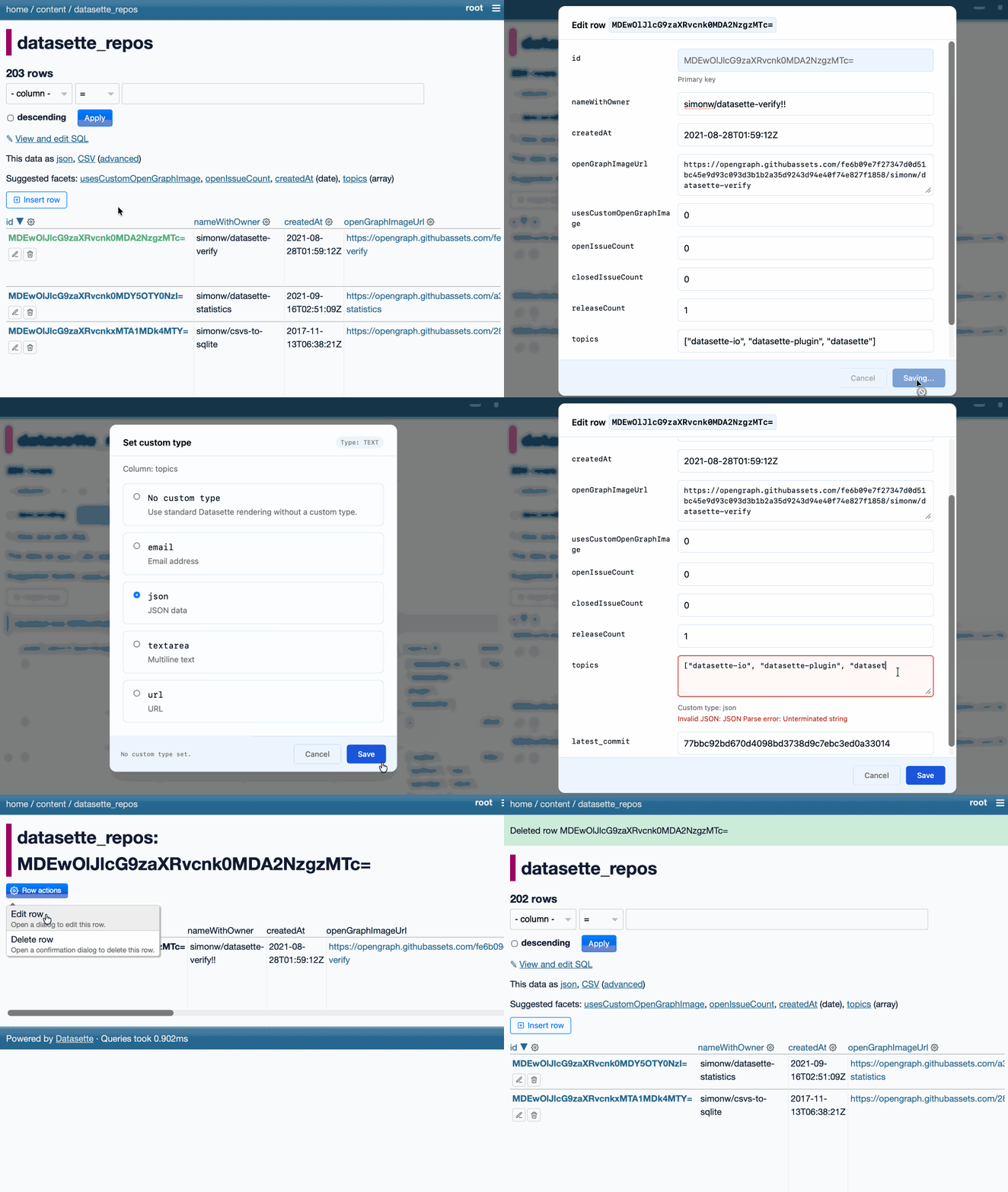
The inspiration for this feature - which is long overdue - was Datasette Agent. I added SQL write support to that the other day which highlighted how absurd it was that you could insert and edit ties via the chat interface but not in the regular Datasette UI!
A very experimental alpha plugin which lets you do this:
datasette tailscale mydata.db \
  --ts-authkey tskey-auth-xxxx --ts-hostname datasette-preview
This starts a localhost Datasette server with a Tailscale sidecar that connects it to your Tailnet, such that http://datasette-preview/ serves Datasette.
It's using the Python bindings for the experimental tailscale-rs library. I filed an issue asking if there's a cleaner way of setting up the proxy mechanism.




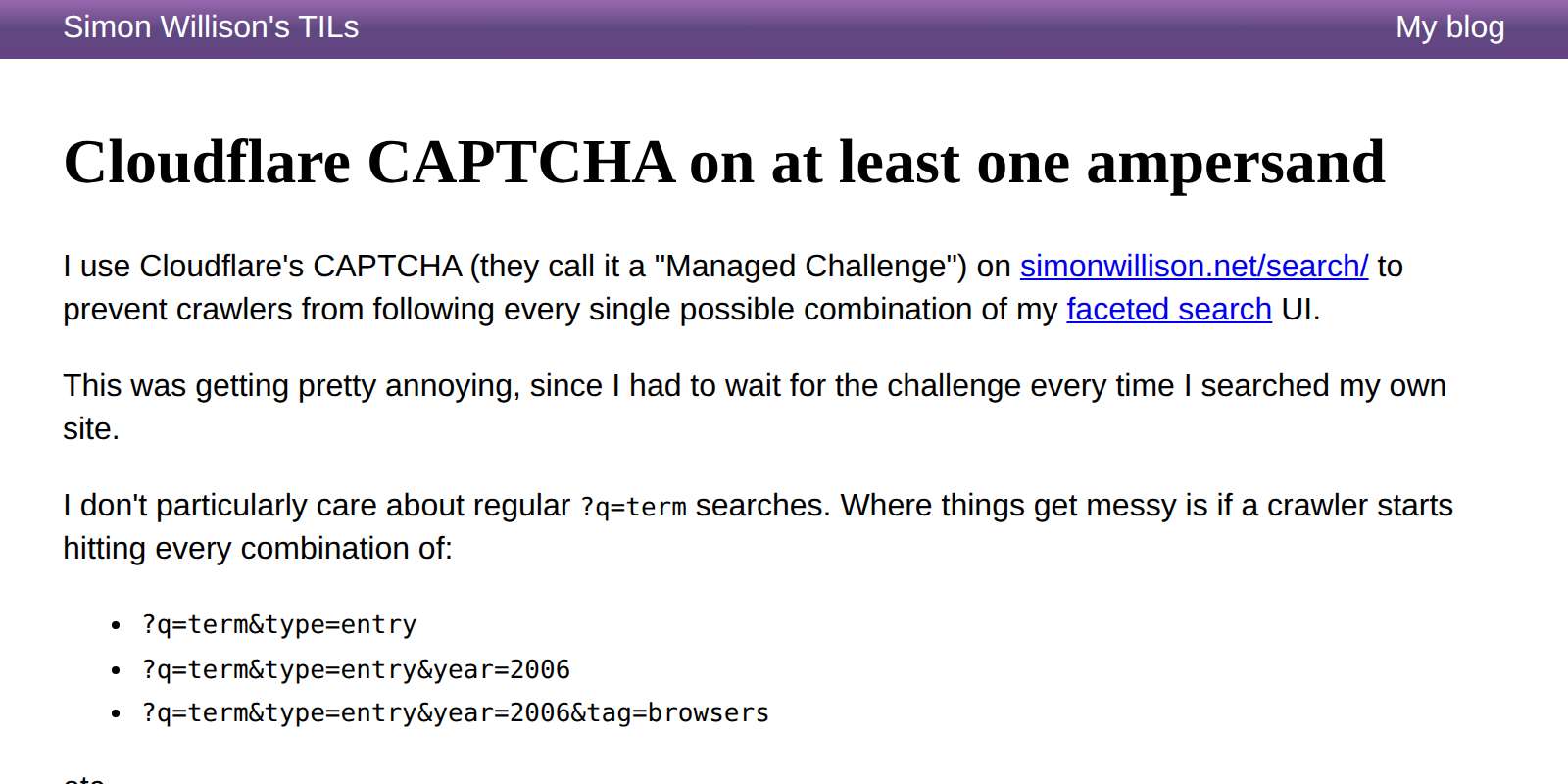
I'm using Cloudflare's CAPTCHA (they call it a "Web Application Firewall > Custom rules > Managed Challenge" these days) to prevent crawlers from aggresively spidering my faceted search engine on this site, but I got fed up of even simple ?q=term searches triggering the challenge.
After some mucking around with Claude Code it turns out you can register the following rule instead, so the CAPTCHA only kicks in for search URLs containing at least one ampersand:
(http.request.uri.path wildcard r"/search/*" and http.request.uri.query contains "&")
And now /search/?q=lemur works without triggering a CAPTCHA!
Also included: notes on trying out the Cloudflare MCP with Claude Code, though it turned out not to be able to edit the rules in question so I had Claude Code switch to the Cloudflare API instead.
- Fixed a bug where users without the
create-apppermission could still create apps. #27- Fixed a bug where it was impossible to grant permission to edit an app to users who were not the app's owner. The rules for edit/delete are now the same as view: if the app is private only the owner can modify it, otherwise permission is controlled by Datasette's regular permission system. #29
- Custom network/CSP origins for apps are now guarded by a new
apps-set-csppermission, with an optionalallowed_csp_originsplugin allow-list for non-privileged users. The Datasette Agent app creation tool enforces the same rules. #24- Stored query picker now supports keyboard navigation and shows the three most recent accessible stored queries when focused.
#fragmentlinks inside apps are no longer intercepted by the external-link confirmation modal. #23- Fixed link confirmation modal and logging panels in
?full=1full-screen mode. #26
- New tool,
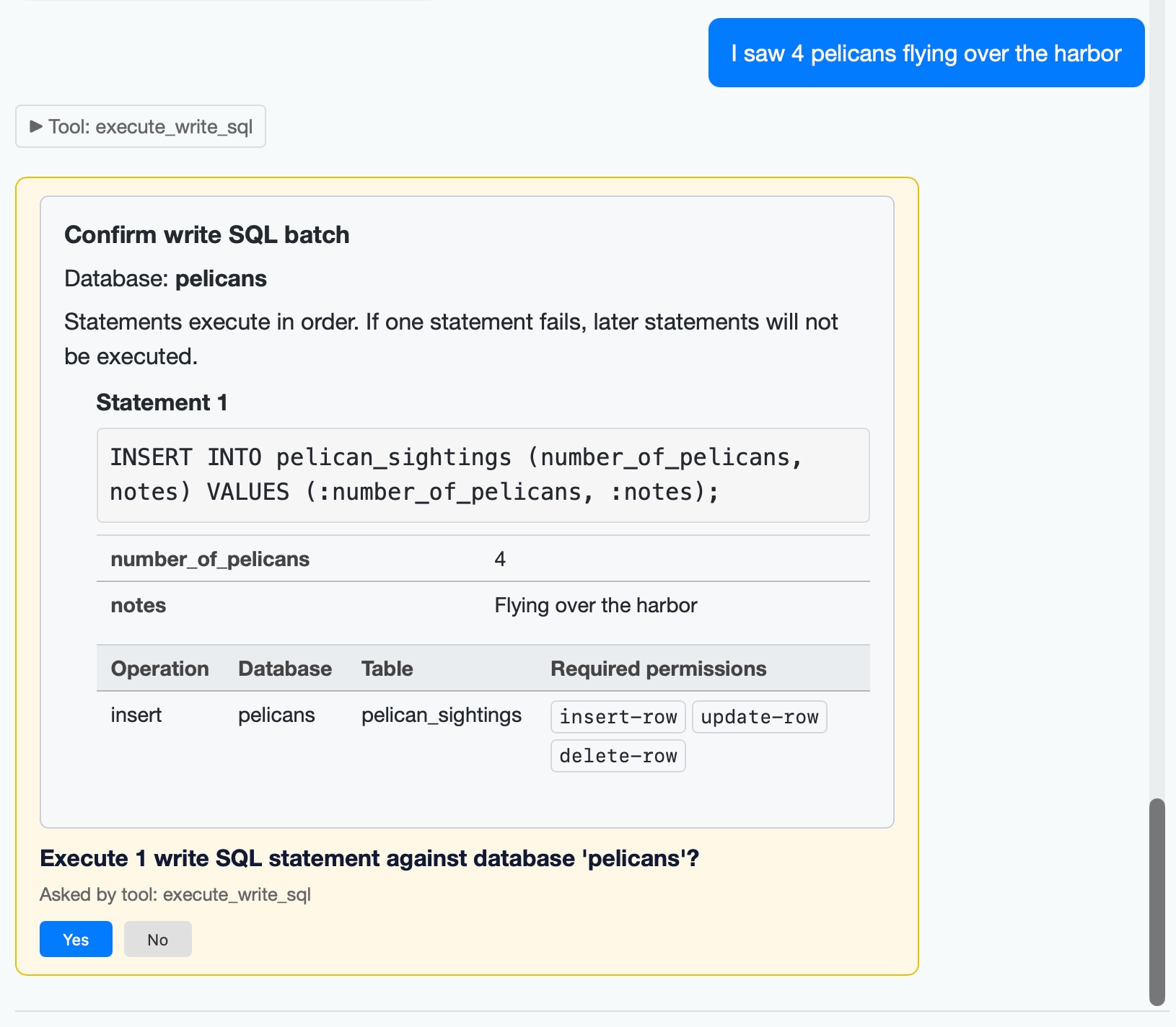
execute_write_sql, which requests user approval and then writes to a database - taking user permissions into account. #27
I added a mechanism for asking user approval in datasette agent 0.2a0. The new execute_write_sql tool can now prompt the user for all kinds of useful operations. Here's an example where I add some pelican sightings to my pelican_sightings table:
The new version also enhances the datasette agent chat terminal mode to support approvals, and adds several new options including --unsafe mode for auto-approving them:
datasette agent chatcan execute tools that require user approval. #30- Three new options for
datasette agent chat---rootto run as root,--yesto approve all ask user questions, and--unsafefor both.- Tools can now provide plain text alternatives to HTML, for display in the
datasette agent chatCLI. #31
The datasette agent chat content.db -m gpt-5.5 --unsafe command can now be used to chat directly with a specific database and directly modify it through prompts like "create a notes table", "add a note about X" etc.






See Publishing WASM wheels to PyPI for use with Pyodide for details.
It would be neat if arbitrary SQL queries in Datasette could be rendered with additional information based on which columns from which tables were included in the results.
To build that, we would need to be able to look at a SQL query like select users.name, orders.total from users join orders on orders.user_id = users.id and programmatically identify the table.column for each result - navigating not just joins but also more complex syntax like CTEs.
I decided to set Claude Code (Opus 4.8, since Fable is currently banned by the US government) on the problem. It found several promising solutions - one using apsw, another that uses ctypes to access the SQLite sqlite3_column_table_name() C function (which is not otherwise exposed to Python), and one using clever interrogation of the output of EXPLAIN.


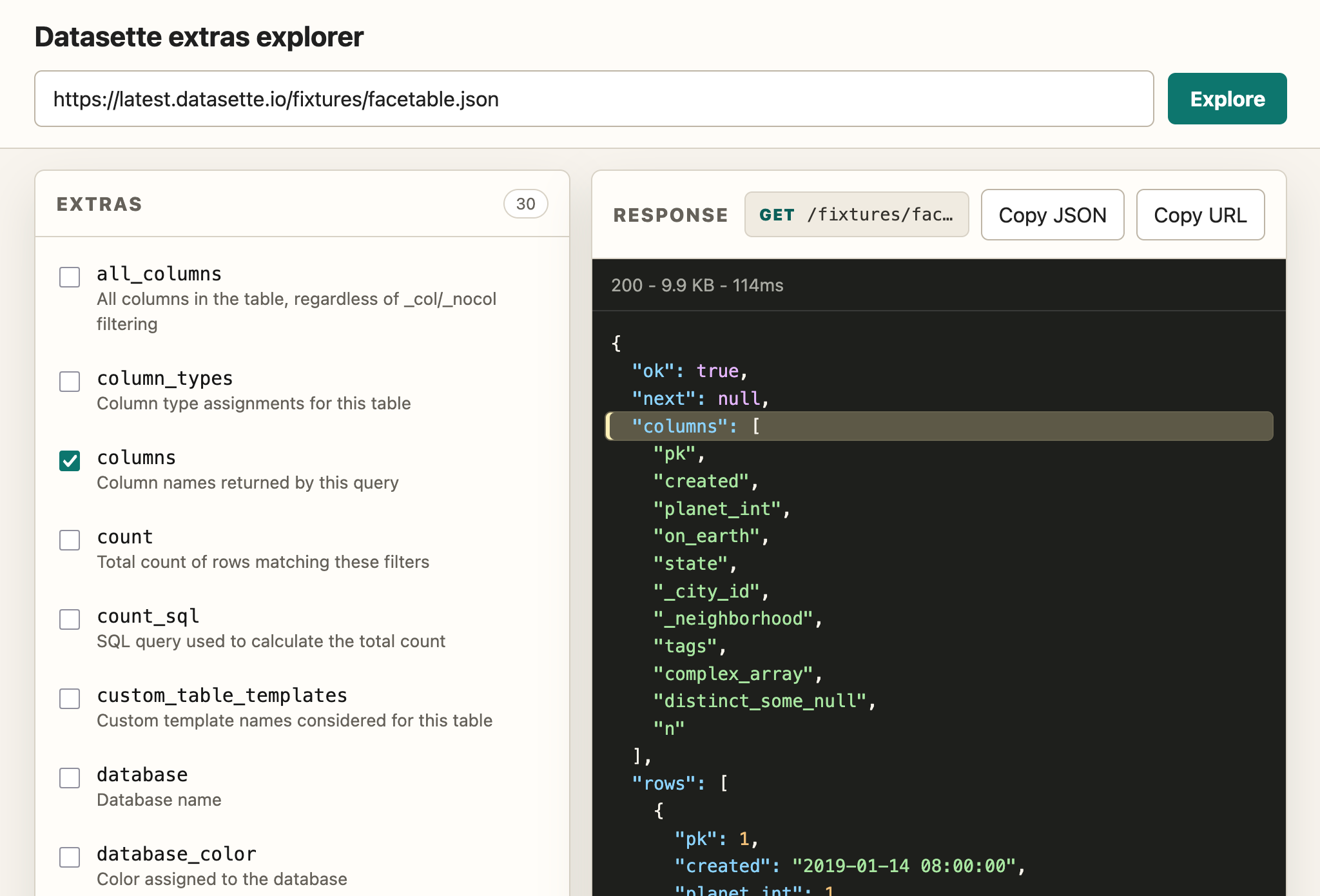
This alpha is a significant step on the road to a stable 1.0, finally extending the ?_extra= pattern I introduced in Datasette 1.0a3 to cover queries and rows in addition to tables. That pattern is also now documented!
I wrote a whole lot more about the new release on the Datasette project blog: Datasette 1.0a33 with JSON extras in the API.
Because API explorer tools are almost free to build now I had Claude Fable 5 in Claude Code (for the plan) and GPT-5.5 xhigh in Codex Desktop (for the implementation) build me this custom extras API explorer to help demonstrate the feature:
I built this utility library to support an asyncio dependency injection pattern a few years ago. I was using it with Datasette and Claude Fable 5 spotted some bugs in the dependency which it then fixed for me. It's a very proactive model!
Highlights from the release notes:
- Tools can now ask the user questions mid-execution. Tools that declare a
contextparameter receive aToolContextobject, andawait context.ask_user(...)can ask a yes/no, multiple-choice (options=[...]) or free-text (free_text=True) question. While a question is unanswered the agent turn suspends: the question renders as a form in the chat UI and persists to the internal database, so suspended conversations survive a server restart. Once answered, the tool re-executes from the top with stored answers replayed, so callask_user()before performing side effects. #20- New built-in
save_querytool: the agent can save SQL it has written as a Datasette stored query. Saving always requires human approval - the agent shows the full SQL plus the proposed name, database and visibility, and nothing is stored until you click Yes. #20
The ask_user() feature was enabled by the new LLM alpha I built yesterday with the help of Claude Fable 5.