Elsewhere
Release TIL Research Tool Museum Sighting Comment
Filters: Sorted by date


This release of the Anthropic plugin for LLM mainly provides compatibility with the recently released anthropic v1.0.0 Python library, which switches from httpx to httpx2. OpenAI made the same change in their v3.0.0 release two weeks ago.
Anthropic provide this migration guide for upgrading to 1.0, so I prompted Fable 5 in Claude Code with:
Upgrade to anthropic>=1 - read https://raw.githubusercontent.com/anthropics/anthropic-sdk-python/refs/heads/main/MIGRATION.md and get the tests passing
Here's the resulting PR.





My highlights from this release:
I shipped a quick 0.32.1 fix for this yesterday, but this is the more comprehensive fix.
llm embedandllm embed-multinow accept--key. The PythonEmbeddingModel.embed(),EmbeddingModel.embed_multi(),Collection.embed()andCollection.embed_multi()methods acceptkey=too, passing the resolved per-call key to embedding plugins without changing shared model state. Existing plugins that readself.keycontinue to work through a compatibility fallback. Thanks, ChrisJr404. #757, #1620
The embedding models now use the same pattern for keys that regular LLM models do.
llm prompt -t/--templatecan now be repeated to combine templates in order. This allows model configuration and options from one template to be used with a prompt from another.
This unlocks a neat pattern where you can create templates that package a model with a set of default options:
llm -m gpt-5.6-luna -o reasoning_effort high --save lhigh
llm "Generate an SVG of a pelican riding a bicycle" --save pelican
# Combine and run the templates
llm -t lhigh -t pelican
- Reasoning-capable Responses API models now support a
reasoning_summaryoption withauto,concise, anddetailedvalues. This can be used with llm openai endpoint --responses. #1600
This is particularly useful for exercising different models that provide their own imitation of the OpenAI Responses API.
Fresh installs of LLM stopped working the other day because the OpenAI Python library dropped its usage of httpx, and it turned out LLM depended on that library but only installed it via a transitive openai dependency.
This dot-release fixes that for the moment by pinning to openai<3, and a soon-to-drop 0.33 release will switch from httpx to httpx2.
Now that this plugin is compatible with LLM 0.32 it can display the reasoning traces for LLMs available through OpenRouter.
- Updated for compatibility with LLM 0.32.
- Models now use OpenRouter's implementation of the Responses API.
- Three new server-side tools: Shell, WebFetch, and WebSearch. Enable these with options like
-T WebSearch.


Today saw the long awaited release of Bun 1.4, the first stable version since the infamous Rust rewrite a few months ago.
Interestingly, the Rust rewrite was downplayed in the release notes, which introduced a bewildering array of new features and claimed 2,900 additional bug fixes:
Bun 1.4 adds +1,517 tests from the Node.js test suite - our biggest jump in Node.js compatibility since Bun 1.0. Bun v1.4 also fixes over 2,900 issues. It reduces idle CPU usage by 5x, reduces memory usage by up to 35%, and starts 50% faster on Linux. It adds
Bun.Image,Bun.WebView,Bun.markdown,Bun.cron(),Bun.Terminal,bun run --parallel,bun test --parallel,bun audit fix,bun dedupe, andbun prune. And it rewrites Bun from Zig to Rust.
Of these the one that most caught my eye was Bun.WebView, which adds first class support for browser automation to Bun core using either macOS WebKit or control of a local Chromium process via the Chrome DevTools Protocol (CDP).
I had Claude Code for web build a prototype of a web API providing the ability to load a web page and then execute JavaScript against it, inspired by my shot-scraper javascript CLI tool - partly to see how much RAM would be needed by such a service.
Here's that TypeScript server implementation, which appears to need a 192MB-256MB container to run a full Chrome against complex web pages - tested using cgroups.
I tasked Claude Fable 5 running in Claude Code for web with the following research task:
Put https://smolmachines.com through its paces as a fast secure sandbox. Explore what it would take to use this to run untrusted Python and JavaScript code in a way that is limited in what RAM and CPU time it can take up (protection against "while true") with no network access and filesystem access only to designated files
Goal is to be able to use this to execute user-provided tasks for things like data transformations
It quickly ran into a problem: the Claude Code for web environment can't run smol machines. Quoting the notes it wrote:
- This Claude Code container: Linux 6.18.5-fc-v20 (itself a Firecracker guest), 4 vCPU, 15GB RAM. No /dev/kvm, no vmx/svm CPU flags → no nested virt.
smolvm machine runfails as expected: "kvm not available".- Plan B: GitHub Actions ubuntu runners DO expose /dev/kvm → run the real test battery via a temporary workflow on this branch, collect logs, remove workflow in final commit.
And Plan B is what it did, installing smolvm and running these tests directly in a GitHub Actions runner against that branch.
That was a creative solution to the environmental limits posed by Claude Code for web. Another example of Fable being relentlessly proactive.



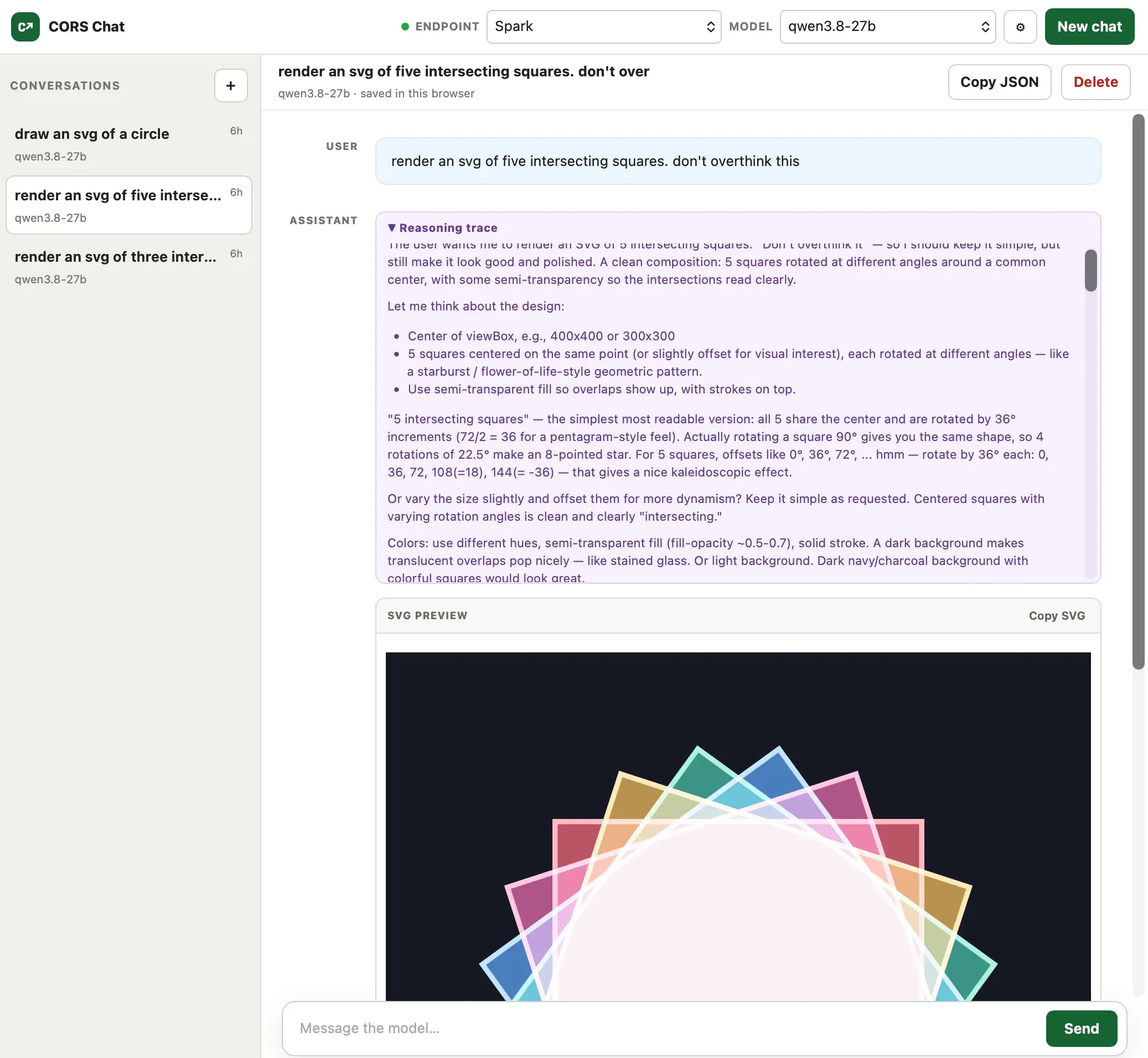
I built this today (with GPT-5.6-Sol xhigh) to help test Qwen 3.8 27B running in LM Studio on both my M5 MacBook Pro and an NVIDIA DGX Spark.
It provides a web UI for exercising an OpenAI-Responses-compatible chat endpoint. I've tried it against LM Studio with the --cors option and OpenRouter, and both work fine.
Conversations are persisted in the browser and can be exported as copy-pasted JSON. One fun detail is that it notices SVG images that are being generated and progressively renders them in the chat while the tokens are still streaming in.

This is Morris.
Morris is a local celebrity: the only known Northern Gannet (Morus bassanus) in the entire Pacific Ocean.
They showed up in the Farallon Islands off the coast of San Francisco 14 years ago. They have since made Pillar Point harbor their home, where they are quite easy to spot: the only white bird with a yellow head, usually hanging out with the smaller black Brandt’s cormorants near the harbor sign visible from the end of the commercial pier.

Fixes a crashing bug in sqlite-utils 4.2. I'd introduced code that looks like this:
from typing_extensions import Self
It turned out the typing-extensions package was not listed as a dependency for sqlite-utils - it was installed by one of the other dependencies in the dev dependency group, but when you uvx sqlite-utils directly you don't get those dependencies.
As part of fixing this I figured out how to run a smoke test to ensure the CLI tool still works even without those dev dependencies, which can be run from the project checkout:
uv run --isolated --no-default-groups sqlite-utils --help
The --no-default-groups argument prevents it from installing that default dev group, and --isolated means that even if there is a .venv/ folder containing extra dependencies they will be ignored for the duration of that uv run command.
Lots of improvements in this one relating to the table.transform() feature, which adds support for complex alter table operations by creating a fresh table, copying across the data and then dropping and replacing the old one.
transform() now preserves a much larger array of edge-case schema definitions, including check constraints, unique constraints and even comments describing the columns.
There are also new introspection properties for check constraints, and a whole lot of other smaller changes.
Includes contributions from Bunlong Heng, ethanhawkes-gif, Rami Abdelrazzaq, nyxst4ck, and ikatyal2110.
(It later turned out 4.2 had a crashing bug, fixed in 4.2.1.)
It's been a while since the last llm-gemini release. This version of the plugin adds support for today's Gemini 3.7 Flash release, plus gemini-3.6-flash, gemini-3.5-flash-lite and two embedding models gemini-embedding-2 and gemini-embedding-001.
The plugin is also upgraded for compatibility with LLM 0.32, which means you can now see reasoning traces and you can also enable server-side tools using this pattern:
llm -m gemini-3.7-flash -T CodeExecution \
  'use python to calculate (factorial of 13) * 3'
I had Gemini 3.7 Flash draw me some pelicans riding bicycles at high, medium, and low thinking efforts (minimal, which was an option in 3.6 Flash, has been removed in 3.7.) Here's the high level one, which is pretty great:

Update 14th August 2026: I had originally said that the SVG rendered incorrectly in Chrome and Firefox, and blamed Gemini 3.7 Flash for producing invalid SVG. That was entirely incorrect: the rendering glitch was my fault, caused by a bug In my rendering tool. I've now fixed that bug.
Performance boost for DuckDB exports and CSV imports, see here.
I've long pondered what a database agnostic version of my sqlite-utils Python library and CLI utility might look like. This morning (literally a shower project) I tasked Codex and GPT-5.6 Sol Ultra with building a prototype:
Do a research spike to see what it would take to build a library with the same core API as SQLite-utils - in particular the insert and upsert and insert_all and upsert_all and create and update methods, and the table introspection stuff - but backed by SQLalchemy so it works for multiple database engines
Test against PostgreSQL and SQLite and duckdb
Use ~/dev/sqlite-utils for reference
Create a git repo for this and commit and early and often - use uv init to start the project - use red/green TDD and pytest, see ~/dev/django-sql-dashboard for one idea as to how the PostgreSQL tests could work
It took very few follow-up prompts to produce this project in a state good enough to release as an alpha.
Here's a one-liner I can use to list the rows in a table in my local PostgreSQL copy of my blog's database:
uvx --with 'alchemy-utils[postgresql]' alchemy-utils rows 'postgresql+psycopg://simon@localhost:5432/simonwillisonblog' redirects_redirect
The output from that starts like this:
[
  {
    "id": 2328,
    "domain": "simonwillison.net",
    "path": "2020/May/21/apple-photos-sqlite/",
    "target": "/2020/May/21/dogsheep-photos/",
    "created": "2020-05-21T13:03:46.591692-07:00"
  },
  {
    "id": 3,
    "domain": "feeds.simonwillison.net",
    "path": "swn-links",
    "target": "https://simonwillison.net/atom/links/",
    "created": "2017-10-01T14:12:54.820729-07:00"
  }
Or if you'd like a DuckDB database with every tree in San Francisco, schema created automatically to match the file:
curl 'https://raw.githubusercontent.com/simonw/sf-tree-history/refs/heads/main/Street_Tree_List.csv' | uvx --with 'alchemy-utils[duckdb]' alchemy-utils insert 'duckdb:////tmp/trees.db' trees - --csv
(That one took nearly an hour the first time I ran it, so I had Codex optimize it and got it down to around 35 seconds.)



This plugin has been around for a while - it lets users upload a brand new SQLite database to a hosted Datasette instance, at which point that database will start being served by that instance.
It can also be used to atomically swap a database with a more recent version. The uploaded database is saved to a file, verified, then swapped in so /name starts serving the new one.
The new release adds a formalized API, so you can replace an existing database (or add a new one) like this:
curl -X POST \
  -H "Authorization: Bearer $API_TOKEN" \
  -H "Accept: application/json" \
  -F "[email protected]" \
  -F "db_name=content" \
  https://your-instance.example.com/-/upload-dbs
This means you can build fresh databases in an environment such as GitHub Actions and swap them in production as soon as that build has completed.

I'm perennially interested in options for storing revision histories in relational databases. While out on a dog walk I had a new idea: how about taking the full text of every prior version in a big JSON array of strings and then applying zlib or zstd compression to the whole thing? Surely that would compress really well due to all of the repeated strings.
The new GPT‑Live voice mode in the ChatGPT iPhone app has got really good, so I discussed the prototype with that. You still can't share URLs to voice conversations, but here's what I said copied from the transcript as a proper stream of consciousness:
I have an interesting idea for a scheme for saving all previous versions of a piece of text that's constantly edited in a SQLite database um column in as efficient a way as possible. Okay, so I built these kinds of systems in the past, and it's always difficult to come up with a efficient way to do this. Like the easiest way is you have a row for every previous copy of the previous previous value of the string. But if it's a long document Like20 kilobytes of data, that means that every single edit adds another 20 kilobytes of data to the database, right. So, what I've now thinking, is um compression would work really well, right? If you Bundle all of those different um Every every version of this document all the way back to the start if you were to apply a good compression algorithm to them that should basically wipe out huge amounts of the redund- the um redundant text, right Um, so what I'd thinking is how about really, really simple mechanism There is a history column on the single on this uh uh table and it's a blob, it's a BLOB so it stores binary data and then you just stick in there a Zlib or maybe even ZSTD um compressed JSON text array of all of the previous documents, and so you probably have two columns, right? You'd have a column that's this magic JSON array of text You have a second column which is a JSON array of timestamps and that doesn't need to be compressed at all, right? A timestamp can just be a uh- it's an array of integers, right? Unix integers But that's the whole scheme.
Then I stopped voice mode and typed the following text prompt to GPT-5.6 Sol Pro:
Use Python and Build experimental prototypes around this idea
It churned away for 38 minutes and delivered this answer plus the files you see in this folder.
The approach works really well! 1,000 simulated revisions to a document resulted in 20.4 MB of raw revision text that compressed to 80.3 KB as Zstandard-compressed JSON array.
To avoid the overhead of decompressing and recompressing the entire array on every edit Sol suggested breaking the history up into multiple rows, with each one containing a maximum of either 128 revisions or 3MB of uncompressed JSON.
Upgraded for compatibility with `sqlite-utils 4.
This release fixes a SQL injection security issue that affects Datasette instances that serve a mixture of public and private tables in the same database, with access configured using the Datasette permissions system.
Site administrators who serve private tables in this way are advised to disable the execute-sql permission
` on that database to prevent users from accessing private tables using raw SQL queries. The bug that has been fixed would have allowed users with access to any public table to execute SQL injection attacks despite that restriction, giving them read-only access to data in private tables in the same database. This fix is also available in Datasette 0.65.3.
Thankfully this particular configuration - private tables and public tables exposed for the same database within the same instance - is likely to be rare. I've not encountered an instance like that myself.
Back-ported the SQL Injection security fix from 1.0a38.



Includes new features enabled by LLM 0.32:
- New models:
claude-fable-5,claude-sonnet-5, andclaude-opus-5. #75, #76- Added server-side tools for
WebSearch,WebFetch,CodeExecution, andAnthropicMCP, available through LLM's-Tinterface or Pythontools=. The previous-o web_search*options have been removed in favor of-T WebSearch. #79- Upgraded to llm>=0.32. Reasoning, tool calls, tool results, and server-side tool results now stream as typed events. Reasoning for
llmCLI prompts now displays to standard error unless you pass--hide-reasoning/-R.- Simplified extended thinking to
thinkingandthinking_effort(low,medium,high,xhigh, ormax). Claude 5 models think by default;-o thinking 0disables thinking for Sonnet 5 and Opus 5, while Fable 5 always thinks.-R/--hide-reasoningnow omits reasoning from responses and logs. Thethinking_budget,thinking_display, andthinking_adaptiveoptions have been removed. #80
Comment My comment on Now we have a timeline of the OpenAI accidental attack against Hugging Face — Hacker News
I think one of the most interesting details here might be tucked away in that first bullet point:
The more I think about this the more I suspect that the fact this happened while training a new model is key to understanding what went wrong.
In RLVR - Reinforcement Learning with Verifiable Rewards - you set the model a goal and have it take any steps necessary to achieve that goal.
Clearly one aspect of OpenAI's training here is to RLVR their models for cybersecurity tasks. Just like pre-training benefits from dumping in vast sources of knowledge, the more tasks you can feed into RLVR the more of a general purpose capable model you get at the end.
This also helps explain why the models had nothing to cause them to hold back. Those safety behaviors are added much later in the process.
AND it explains (but does not excuse) why monitoring was so lax. If you're training a new model like this you presumably set it thousands of tasks like this in parallel. I can see how you might miss that a tiny subset of your training agents have started leaving each other messages in filenames on your packaging server.
Someone once told me that you can't just leave the racist materials out of your training data if you want a non-racist model: it has to have seen examples of racism in order to later be taught that racism is bad.
I can see echoes of that here. If your model doesn't know how to aggressively hack things how do you later teach it not to?
(I have little knowledge of how RLVR works in practice so I'm looking forward to hearing from people who can help me understand if I'm on the right track here.)
# 8th August 2026, 2:06 pm / ai, openai, generative-ai, llms, ai-security-research, openai-hugging-face-incident